Is there a Big Bass Vegas Double Down Deluxe app?
Pragmatic Play does not publish a standalone app for this slot. It supplies games to casinos, and the casinos deliver them to you, which on a phone means one of two routes.
Route one is the browser: open a licensed casino in Safari or Chrome, log in and tap the game. It loads in HTML5, so nothing is installed. Route two is a casino's own app from the App Store or Google Play, where the same game sits inside the lobby.
Either way, you get the same reels, the same two fishermen and the same 5,000x cap. The domain name of this site includes "app" because people search that way; we do not offer or host any app.
Can you download it? Why APK files are a bad idea
You can download a casino's official app, but never a "Big Bass Vegas Double Down Deluxe APK" from a file site. Those packages are not published by Pragmatic Play, and they are a common way to spread malware or steal logins.
A fake app can also show a fake game, and results that are not generated by the real provider server have nothing to do with the 96.50% RTP, and any "winnings" there are worthless.
Set it up on iPhone and Android in two minutes
A home screen shortcut gives you app-style access without any download, and setting one up takes six quick steps.
- Open a licensed casino site in Safari (iPhone) or Chrome (Android). In Ontario or Alberta, use a provincially registered site.
- Log in and complete the age and ID check. Allow location access when asked; regulated sites must confirm your province.
- iPhone: tap Share, then "Add to Home Screen". Android: tap the three-dot menu, then "Add to Home screen" or "Install app".
- Open the shortcut, search "Big Bass Vegas Double Down Deluxe" and start in demo if the casino offers it.
- Rotate or tap the portrait mode option. The grid fills more of the screen and the buttons are easier to hit.
- Set a deposit limit in the account menu before your first real spin.
Why the game is blocked or missing features on your phone
Most mobile problems come from rules rather than from the game itself, so the table pairs each symptom with its likely cause.
| What you see | Likely cause | What to do |
|---|---|---|
| "Not available in your location" | Geolocation check failed, or you are outside the site's licensed province | Turn on location services, switch off VPN, try Wi-Fi |
| No autoplay button | Ontario rules ban auto-play on slots | Nothing: press spin each round |
| Spins feel slower | Ontario minimum of 2.5 seconds per game cycle | Normal on registered Ontario sites |
| No bonus buy button | The feature is off in that market, at that casino, or while a bonus is active | Check the casino's terms; use natural triggers |
| Game will not load | Old browser, low memory, or content blocker | Update the browser, close other tabs, allow the casino site |
Does it work on iPhone and Android?
Yes, on any recent iPhone or Android phone with an up-to-date browser. Published game data confirms support for iOS and Android and a dedicated portrait mode.
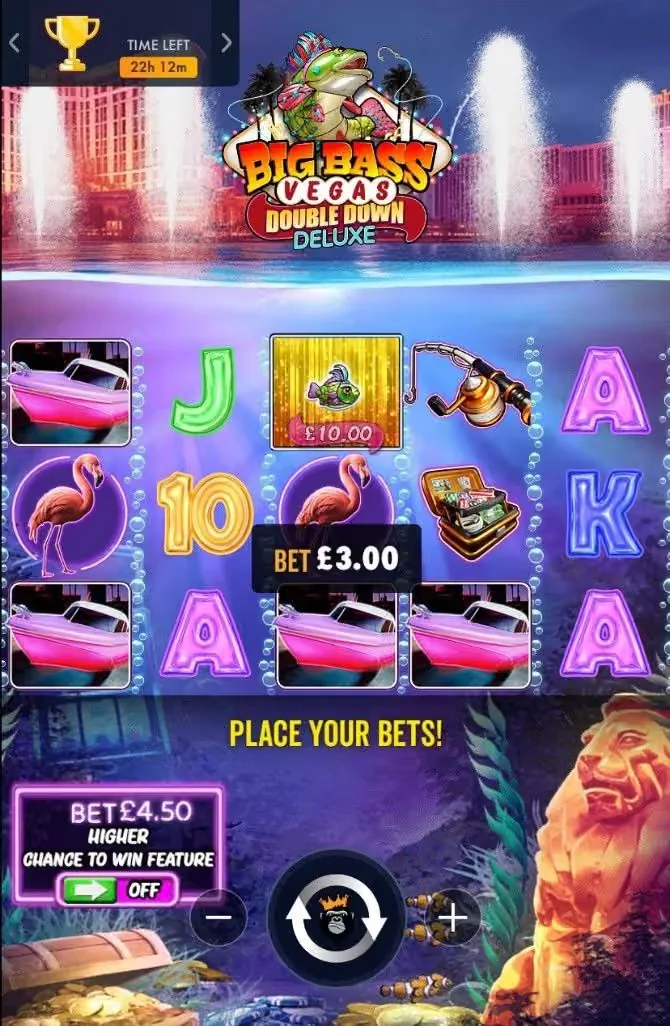
Portrait mode is the main mobile upgrade: the reels sit in the middle, the spin button falls under your thumb, and the ante bet switch moves to the bottom left. Tablets work too and show the landscape layout by default.
Battery and data use are modest for a slot. On a weak connection, finish the bonus round before you move out of Wi-Fi range. The game's rules screen explains how an interrupted round is handled, so read that section once.
Browser or casino app: which should you use?
Both are safe at a licensed casino and the game is identical; the difference is convenience against footprint on your phone.
The browser route needs no install, updates itself and leaves nothing behind when you log out. It is the better choice if you play now and then, or if you want to keep gambling apps off your home screen. A home screen shortcut gives you the one-tap access without an install.
A casino's own app from the App Store or Google Play can load faster and keep you logged in. It also sends notifications, which some players find hard to ignore. If you install one, turn promotional notifications off and set your deposit limit inside the app on day one.
Whichever you pick, the rules about age and location still apply. The app cannot get around a geolocation check, and in Ontario you still get no autoplay and a 2.5-second minimum spin.
How to keep control when the casino is in your pocket
A phone makes it easy to play in spare minutes, and those minutes add up faster than a session at a desk. Set your guardrails on the phone itself, not only in your head.
Start in the casino account: set a daily or weekly deposit limit and turn on session reminders if the site offers them. Then use the phone's own tools. Screen Time on iPhone and Digital Wellbeing on Android can cap how long a browser or casino app stays open each day.
Keep the ÷300 bet rule from the strategy page even on small screens, where the plus button is easy to tap by accident. If you notice you are opening the game out of habit rather than for fun, take a break or use the site's self-exclusion option.
Mobile questions
Is there a Big Bass Vegas Double Down Deluxe app?
No official standalone app. Play in a licensed casino's mobile site or inside that casino's own app.
Can I download it as an APK?
Not safely. APKs from file sites are not from Pragmatic Play. Use Google Play or the casino's own download page only.
Does it work on iPhone and Android?
Yes, in Safari and Chrome, with a portrait mode that fits the grid to your screen.
Why is the game blocked on my phone?
Usually a failed location check or a VPN. Regulated Canadian sites must confirm you are in their province before real-money play.
Can I play the demo on mobile?
Yes. The free demo runs in a phone browser with no account, the same way as on a computer.
Play it on your phone for real
Outside Ontario and Alberta, our partner casino runs this slot in its mobile site with a 500% welcome offer. Add the site to your home screen, set your deposit limit, and read the offer's terms before you claim it.
Get the 500% offer on mobile19+ in most provinces, 18+ in Alberta, Manitoba or Quebec. Partner link.